Beyond the Chatbot: How to Build a 3-Agent Team to Handle Invoicing and Support
The era of the solitary AI chatbot is ending. For small business owners, the "one-bot-fits-all" approach often leads to hallucinations, forgotten context, and frustrated customers.
The future of automation isn't about building a smarter bot; it’s about building a smarter team.
Welcome to the world of Agentic AI. Specifically, we are looking at multi-agent orchestration for small business workflows—a strategy where specialized AI agents collaborate to solve complex problems, just like a human department would.
Here is how you can move beyond basic prompts and deploy a 3-agent workforce to automate your customer support and invoicing today.
What is Multi-Agent Orchestration?
In simple terms, multi-agent orchestration is the software architecture that allows different AI agents to talk to one another, hand off tasks, and share information to achieve a common goal.
Think of a standard LLM (Large Language Model) as a brilliant generalist hire. They know a little about everything but aren't an expert in your specific business processes.
- Single Agent: Tries to be the receptionist, the technician, and the accountant all at once. It often gets confused.
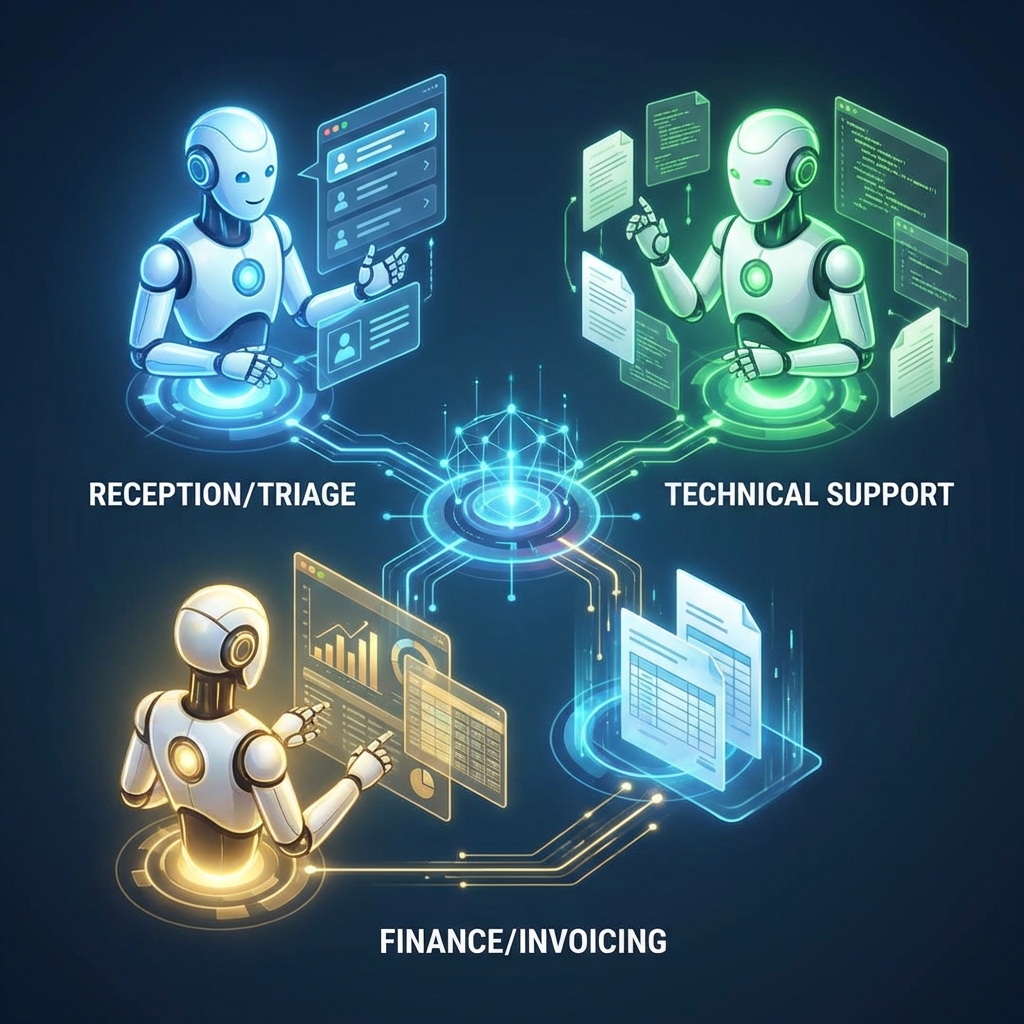
- Multi-Agent Orchestration: Assigns one AI to be the receptionist, one to be the technician, and one to be the accountant. A central "orchestrator" manages the workflow between them.
For small businesses, this separation of duties is the secret to high-accuracy automation.
The Blueprint: Your New 3-Agent Team
To demonstrate multi-agent orchestration for small business workflows, let's build a practical architecture that solves two of the biggest time-sinks: answering tickets and chasing payments.
Agent 1: The "Gatekeeper" (Triage & Intent)
- Role: Receptionist
- Goal: Analyze incoming emails or chat messages and decide who needs to handle them.
The Gatekeeper does not answer questions. Its only job is to classify the intent. It reads a customer email and tags it: "Technical Issue," "Billing Question," or "Spam."
Why it works: By focusing only on classification, this agent rarely makes mistakes. It ensures the Finance Agent never sees a password reset request.
Agent 2: The "Solver" (Knowledge Base Support)
- Role: Customer Support Rep
- Goal: Answer questions using only your approved business documentation.
Once the Gatekeeper identifies a "Technical Issue," it routes the conversation here. The Solver is grounded in your specific data (PDFs, Notion docs, website FAQs).
The Workflow: It retrieves the answer, drafts a polite reply, and marks the ticket as "Resolved" if no further action is needed.
Agent 3: The "Closer" (Invoicing & Finance)
- Role: Accounts Receivable
- Goal: Verify subscription status and generate invoices.
If the Gatekeeper identifies a "Billing Question" (e.g., "Where is my invoice?"), it routes the user here. This agent has tool access—it can connect to your accounting software (like QuickBooks, Xero, or Stripe).
The Workflow: It looks up the user's email, checks the last unpaid invoice, generates a PDF link, and replies to the customer with the document attached.
How to Orchestrate the Handoff
The magic lies in the orchestration layer. This is the logic that prevents Agent 2 and Agent 3 from talking over each other.
In a small business context, you can achieve this using low-code tools like Zapier Central, Make (formerly Integromat), or Microsoft Power Automate, or code-heavy frameworks like LangChain or AutoGen.
The Orchestration Flow:
- Trigger: An email arrives in support@yourbusiness.com.
- Orchestrator Action: Sends the text to Agent 1 (Gatekeeper).
- Decision Node:
- If Intent = Support: Route to Agent 2. Agent 2 drafts a reply > Human approval (optional) > Send.
- If Intent = Billing: Route to Agent 3. Agent 3 calls Stripe API > Gets Invoice URL > Drafts reply > Send.
- Feedback Loop: The conversation log is updated so if the customer replies, the Orchestrator knows the history.
Why This Beats a Standard Chatbot
1. Security and Privacy
You don't want your Support Bot to have access to your Stripe account. By using multi-agent orchestration, you "sandbox" permissions. Only the Finance Agent can touch money; the Support Agent can only read PDFs.
2. Higher Accuracy
When you force one AI to do everything, the "context window" (its short-term memory) gets cluttered. Specialized agents have focused prompts, reducing hallucinations significantly.
3. Scalability
Need to add a Sales Agent later? You just plug it into the orchestration layer. You don't have to retrain the entire system.
FAQ: Multi-Agent Orchestration for Small Business
Q: Do I need to know how to code to build this?
A: Not necessarily. Platforms like Zapier Central, Relevance AI, and Stack AI allow you to build multi-agent workflows using a drag-and-drop interface. However, complex orchestration may require some Python knowledge or a developer consultant.
Q: Is this expensive to run?
A: The cost is surprisingly low. You pay for the API usage (tokens) of the models (like GPT-4o or Claude 3.5). For a small business handling a few hundred tickets a month, the cost is often less than $50/month, exclusive of the platform subscription fees.
Q: What happens if the agents get stuck?
A: A good orchestration workflow always includes a "Human Handoff" protocol. If the Gatekeeper cannot identify the intent with high confidence (e.g., <80% certainty), the Orchestrator should flag the email for a human review rather than guessing.
Q: Can these agents work while I sleep?
A: Yes. The primary benefit of multi-agent orchestration for small business workflows is 24/7 autonomous operation. Your Finance Agent can send invoices at 3 AM just as easily as 3 PM.
Ready to build your team?
You don't need to hire three new employees to streamline your operations. You just need to orchestrate three specialized agents.